Showing posts with label Pose. Show all posts

Thursday, May 17, 2012

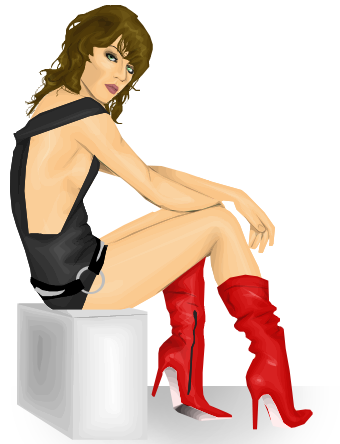
Guess Who!

I made everything here by myself :D
This is the first time, in a long time I made a pose from scratch, It's not too bad at the moment...
Can you all guess who she is?

Friday, December 3, 2010

Preggers :)

*please note this is just a stunt - so it's not real

Well, I have been keeping a big secret from you all. I am 8 months pregnant. Nearly 9. And the special thing is it's going to be a Christmas baby. This is just a photo of how big I am and that I'm not fat (as some of you have said).
Hmm, I wonder what I'm having. I'm keeping it as a surprise.
What do you think of these names??

Raiman - Boy
Konnie - Girl.
If it's a girl I want her to grow up cool like me and smoke when she's 8 and get into serious trouble with all of the schools she goes to. If it's a boy I just hope that he doesn't grow up with a baby bell and is good looking, cause I till every single one of my boyfriend's parent's their son's fault.

Thursday, October 21, 2010

Milla :)

4 hours :)
The face was SO hard to do... But I got it right in the end.
The shading is probably the best I have done! Body and clothes! I love the hair and the shininess too! Hope it looks greasy :) I tried to make it look as Resident Evil-ishy as I could. Like her hair in the third movie :) I hate how they haven't washed for 6 months, but yet they have perfect skin, makeup, a clean shave, clean-ish clothes, EVERYTHING! I'm so jelous... I haven't showered in about 16 hours... So that's before I slept... My legs need shaving AGAIN, my makeup sucks... EVEN AFTER WITH IT REMOVED, YOU CAN SEE IT, I'm wearing clothes I slept in, well a shirt, but I don't have many clothes haha.
Well, I guess that's it :) cya, oh and till I am back, I would LOVE some feedback.

xoxo
Eliza

Tuesday, September 21, 2010

Update on blog - Ben 10

Hey everyone :) Haven't posted in a couple of days, sorry... But I have been busy, busy. Especially real life duties. Anyways, that isn't too important...

Well, as close friends should know by now, I LOVE Ben 10... It's just one of the weird obsession I have... Anyways, I started this yesterday or the day before, but I have only just finished it cause I've been doing graphics while I've been least busiest. So that's really at night time. Well yeah...
So, Ben 10 it is...
Also, because I can't quite keep up with graphics people want to purchase, I am creating a mini shop as a page on the blog. It will hold all that I am selling at that moment. Sometimes there will be limited edition items. And to save time, ONLY ORDER IF YOU MAKE SURE YOU KEEP IT!!! SO IF YOU ORDER YOU HAVE TO PAY FOR IT!!!

So yeah, that is a future plan... Enjoy

Tuesday, September 14, 2010

New Poses :D

New poses are available for purchase:
50sds each
100sds pose pack (so that's 50sds off if you buy them all)
png or psd files ONLY
If you don't have a program that doesn't read psd files you will have to use the png set :)
terms and conditions apply

contact me in my guestbook if interested


Thursday, February 18, 2010

New Pose


From Scratch
Comment
Love You

Sunday, December 27, 2009

Tutorial - How To Make Your Own Poses

http://www.topshareware.com/PhotoStudio-download-13795.htm  Download and install for this tutorial to work.

-POSES-


Ok, so you just installed PhotoStudio. So what you need to do is Put your medoll on a white background and make her half size(so the same size as the rotation of her). Screen shot it and cut out the head to the top of the shoulders.

Now, open PhotoStudio and then with the open option, open the picture of your medoll's head. Get rid of the hair and the face with the free select tool and make her look bald. (you can click where to go with it.)
Now, make the body. (Making this body was an example, once you think you are ready you can make your own poses.)

Start at the shoulders and make one arm. The arm can go in which ever direction it wants, just keep it down for now. Now as you see in the picture about I drew a whole torso with the select tool. To do this once you are done with the arm double click and then start the rest of the picture with the free select tool. Before you finish what you want make sure you hold in shift while double clicking. Color in your selection the same tone as your doll's original skin.
Now to put in the breasts and other details, see the pre-shading under the neck? Dark, Medium, Light? Well get the paint brush and hold shit. This will make the eyedrop tool appear. Select the light shading and then get the free select tool again.
Make detail curves for the tits and other parts so it will look like this :
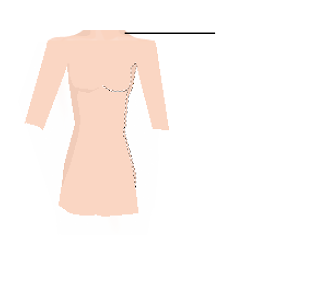
you can see what shade you should use where the black line is pointing
Now, start doing the legs. They are probably the easiest thing you can do in graphics ( feet and hands are the hardest. )
First, do just one leg.then make another one and overlap it like it shows in the picture below and use the shift selecting  way. Once you have done both legs the selection should look like this.


Color the legs in and then do the feet. The feet shouldn't need a how to make them as they are so fast to do in this pose. Well, you only do one.
ow finish off the arms and do the hands. The hands get easier once you get the hang of it.  The hand should look something like this once you got the selection.


Color it in and then do the other arm and hand.
Nearly done. Now with the smudge tool go around the edges that need touching up for a perfect pose. And the finish product :


Now, copy and paste hairstyles, faces, and even make your own clothes and shoes for the pose. It is all up to you.

coming soon
 Make Your Own Clothing with PhotoStudio